



Understanding how people find and interact with your website can feel overwhelming at times, but once you get comfortable with the right tools, everything starts to click. Google Search Console (GSC) and Google Analytics (GA4) each give you valuable information, and knowing when to use one or the other helps you make smarter SEO decisions without getting lost in the data.
This guide walks you through how each tool works, where they shine, and how to use them together. By the end, you will feel more confident working with both tools in any situation.
GSC vs. GA4: What Each Tool Is Designed To Do
Before we compare the tools, let’s take a quick look at the purpose each one serves. This makes it easier to understand which reports help you solve which problems.
What Google Search Console Focuses On
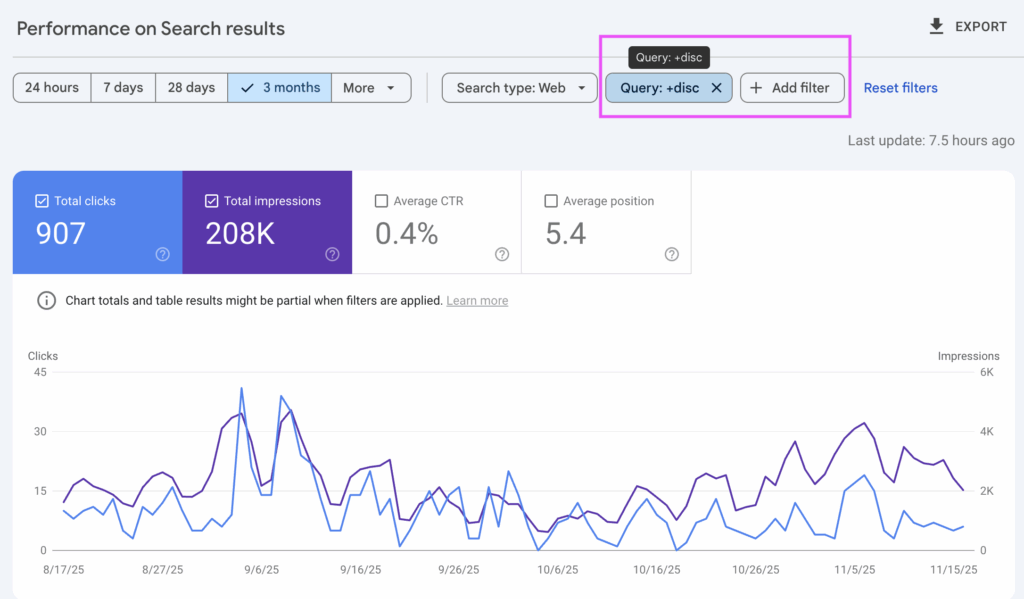
Google Search Console gives you insights into how Google views your site. It focuses on your presence in Google’s Search Engine Results Pages (SERPs), which makes it especially helpful when you want to understand how people discover your pages.
Google describes GSC as a tool that helps you monitor, maintain, and troubleshoot your website’s search presence.
GSC helps you explore things like:
- What keywords people search to find you
- How often your pages appear in search results via clicks, impressions, and CTR
- Average ranking positions
- Indexing and crawl issues
- Core Web Vitals and mobile performance
- Backlinks pointing to your site
For example, if you just published a page about landscaping services, GSC can show which terms it appears for in search results. You might find people are also searching for “yard cleanup near me,” which could inspire a new section on your page.
What Google Analytics Focuses On
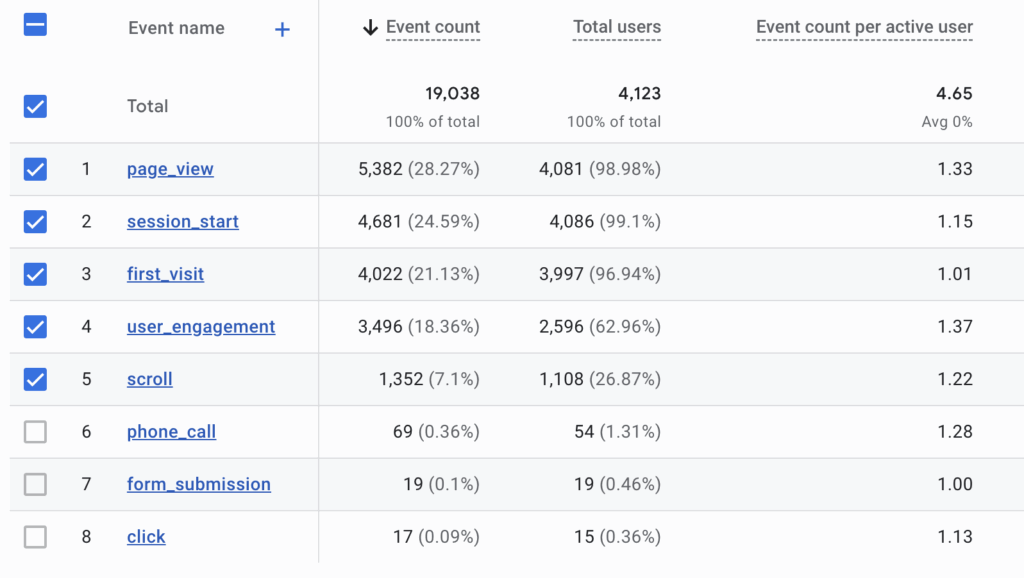
Google Analytics (GA4) focuses on what visitors do once they are already on your website. This includes how they navigate your pages, how long they stay, and which actions they take. Google outlines GA4 as a tool to help you understand user behavior and engagement.
GA4 lets you see:
- Which pages people visit most
- How long visitors stay on your content
- Where users drop off in the browsing journey
- Which traffic sources bring in the highest quality users (e.g. organic, paid, social, etc.)
- Which actions lead to key events and conversions
- How users scroll or interact with your content
For example, if you have a “Book a Consultation” form, GA4 helps you track how many people view it, interact with it, and submit it. This is crucial in the age of AI Overviews, where clicks and impressions matter less as metrics, and conversions matter much more.
The Bottom Line: GSC offers information about how users find your site. GA4 provides insights into how users interact with your site.
How Google Search Console vs. Google Analytics Differ
Now that you know what each tool is meant to do, the differences become clearer. These differences help you confidently decide which tool to open when you have a specific question.
Search Visibility vs User Behavior
GSC focuses on how people find you through Google Search. GA4 focuses on how people behave once they reach your site. When you use both, you get a complete picture of the user journey.
For example, GSC might show that a service page is appearing more often for the keywords you want. GA4 might show that users who land on that page are taking the next step and contacting you. Together, this gives you confidence that both visibility and performance are heading in the right direction.
Data Collection Methods
GSC uses Google’s search logs to track impressions and clicks. GA4 uses a tracking script on your site to collect behavior data. Google notes that search impressions are based on your search result listings, not what happens after the click.
You Should Know: Because the data sources are so different, it is completely normal for numbers in GSC and GA4 to not match. They are simply reporting on different parts of the journey.
Time Frames and Data Retention
GSC stores 16 months of search data. GA4 stores data based on the retention settings you choose, often between 2 and 14 months. If you want long-term visibility trends, GSC helps. If you want long-term behavior insights, GA4 can be adjusted to your needs.
4 Examples of When To Use Google Search Console
GSC is incredibly helpful any time you want to understand or improve how your website appears in Google Search.
1. Use GSC To Understand Keyword Performance Trends
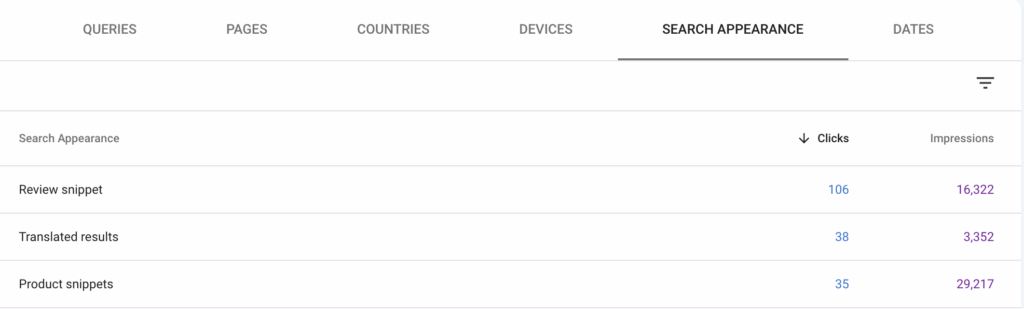
GSC shows which queries lead to impressions and clicks, along with average rankings. This helps you understand exactly how people are discovering your content and how your content is ranking in SERPs. It also offers limited data about SERP features like product listings, translated results, video results, and more, under “Search Appearance”.
Here are practical ways to use this:
- Find rising keywords you can build content around
- Refresh older content based on declining keywords
- Compare branded and non-branded search traffic
- Track seasonal search interest for your services
If you’re a local contractor, you might notice searches for “emergency repair” spike during winter storms. Seeing this in GSC helps you adjust messaging or publish timely, relevant, highly-targeted content.
2. Use GSC To Fix Indexing or Visibility Issues
If a page is not appearing in search results, GSC helps you identify the issue quickly.
Under “Pages” in the left sidebar, you can troubleshoot:
- Pages stuck in “Crawled but not indexed”
- Mobile usability errors
- Pages blocked by robots.txt
- Duplicate URL issues
- Redirect chains or loops
- Thin content
If you just added a new services page but it is not appearing in results, GSC is the first place to look. Google will crawl but won’t index thin or duplicate pages, so you’ll find those URLs here.
3. Use GSC To Measure Core Web Vitals and Mobile Performance
GSC’s Core Web Vitals report highlights loading speed, interactivity, and layout stability issues. These are important for real user experience.
Some examples include:
- Finding large images that are slowing down your page
- Fixing layout shifts that disrupt mobile browsing
- Improving load times for key service landing pages
These improvements can help both search performance and user satisfaction.
4. Use GSC To Review Your Backlink Profile
GSC shows who is linking to your site (aka backlinks). This helps you identify partnerships, industry mentions, and local references.
Examples include:
- Seeing which directories or associations link to you
- Identifying blogs or news sites referencing your brand
- Tracking earned mentions from local organizations
Backlinks help build authority, and GSC provides a simple way to monitor them.
4 Scenarios In Which To Use Google Analytics
GA4 is your go-to when you want to understand what users do once they arrive on your site.
1. Use GA4 To Evaluate Engagement on Key Pages
GA4’s engagement metrics help you see whether your content is doing its job.
Examples include:
- Tracking how long visitors stay on your service pages
- Seeing how far people scroll
- Watching for high exit rates on important pages
- Measuring clicks on phone numbers or contact links
If visitors are leaving a service page too quickly, you may need more engaging messaging or an improved structure.
2. Use GA4 To Compare Traffic Sources
GSC only tracks your organic traffic source, whereas GA4 tracks paid, organic, social, direct, referrals, email, and more. Not all traffic sources perform the same, and GA4 helps you compare them.
Examples include:
- Understanding which social channels send your best visitors
- Seeing how your Google Business Profile (GBP) traffic behaves
- Reviewing whether email campaigns lead to conversions
- Comparing paid, organic, referral, and direct traffic quality
This helps you prioritize your marketing efforts more effectively.
3. Use GA4 To Track Conversions and Form Submissions
GA4 tracks specific user actions, which makes it ideal for measuring leads.
You can track:
- Form submissions
- Clicks on calls to action
- File downloads
- Contact button interactions
- Appointment scheduling requests
This gives you a clear picture of what drives inquiries or conversions, and what percentage of your traffic converts into customers.
4. Use GA4 To Analyze User Paths
GA4 shows how users move from page to page.
Examples include:
- Seeing whether visitors read multiple service pages before contacting you
- Discovering pages where users get stuck or confused
- Finding paths that commonly lead to conversions
These insights help you optimize your layout and improve the overall flow.
When To Use GSC and GA4 Together
Using GSC and GA4 together gives you a full look at how well your marketing is working.
Measuring Content From Discovery To Conversion
When you publish a blog post answering a common question in your industry:
- GSC shows which search queries lead people to the article
- GA4 shows whether those visitors check out your services afterward
This helps you understand content performance from start to finish.
Troubleshooting Traffic Drops
Traffic drops happen, and both tools help you find the cause faster.
For example:
- If impressions drop in GSC, you may have ranking or indexing issues
- If impressions stay steady but GA4 traffic drops, there may be tracking issues or on-page behavior changes
Using both tools together helps you diagnose issues more accurately.
Measuring The Impact of Website Improvements
After updating or reorganizing your content:
- GSC shows whether your search visibility improved
- GA4 shows whether engagement or conversions increased
This helps you see the full impact of your updates.
Bringing It All Together for Smarter Decisions
Google Search Console and Google Analytics give you different but equally valuable perspectives on your online presence. GSC helps you understand how people find you in search results. GA4 shows you how visitors interact with your content and which actions they take. When you use both tools together, you gain a clear picture of what is working well and where improvements can help.
Both tools are robust, and data is meant to be sliced and diced so your team can drill down on queries, pages, and issues. On top of that, GA4 requires more initial set up to successfully track your target goals.
If you ever feel unsure about what the data means or how to put it into action, we are here to support you. These tools become much easier when you have someone guiding you in the right direction.
Have questions about GSC or GA4? Contact us at Astute Communications today. Our team can help you set up tracking, discover actionable insights, and help your website be found more easily by your ideal target audience.